Introduction:
GymOwners.com gives you full control over when your members can register for classes. By customizing registration start and end times, you can better manage class availability, reduce no-shows, and streamline your scheduling process. This guide walks you through setting registration open and close times for both group and private sessions. These settings determine how far in advance members can book a session and when registration should close prior to class start.
Process description:
Registration start and end times can be configured in the Session Schedule section within Business Settings. These settings allow you to control how far in advance members can register for sessions and when registration should close, giving you greater flexibility in managing class attendance.
Step-by-step instructions:
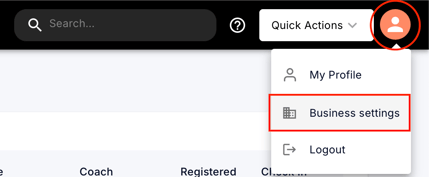
- In the top-right corner of the dashboard, click on the Profile icon.
- From the dropdown menu, select Business Settings
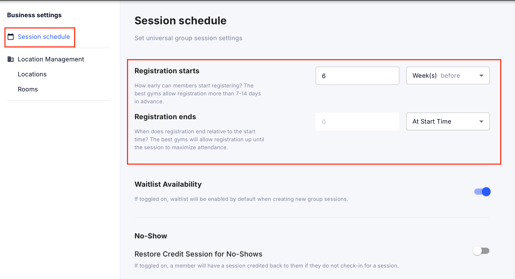
- Within Business Settings, click on Session Schedule on the left.
- Registration starts: Set how far in advance members can register—either immediately after a class is published or at a custom time before the class starts, based on your preference..
Registration ends: Choose when sign-ups end—whether at class start time or at a custom time before the class starts, based on your preference.
Tips and best practices:
- Communicate any changes to registration windows to your members to avoid confusion or missed bookings.
Next steps:
- Review your class schedule to ensure all sessions reflect your updated registration settings.
- Monitor attendance and booking trends to decide if additional changes are needed.