Introduction:
Managing class attendance effectively helps improve member accountability and maximize session availability. GymOwners.com gives you the flexibility to decide whether a credit should be deducted when a member does not attend a scheduled session. This allows you to customize your cancellation and no-show policies to fit your gym’s unique approach to member management. This guide will walk you through enabling the “Restore Credit Sessions for No-Shows” setting.
Process description:
The option to restore credit to a no show can be configured in the Session Schedule section within Business Settings. When activated, this feature ensures that members who miss a class (and do not check in) will have their session credit restored automatically.
Step-by-step instructions:
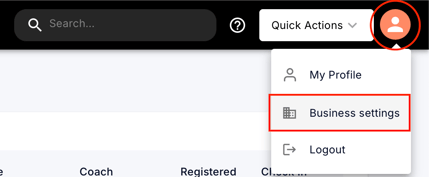
- In the top-right corner of the dashboard, click on the profile icon.
From the dropdown menu, select Business Settings.
- Within Business Settings, click on Session Schedule on the left.
Locate the No-Show setting section.
Toggle on Restore Credit Sessions for No-Shows to enable automatic credit restoration for members who don’t check into their scheduled session.
Tips and best practices:
- Use this setting if your gym prefers to avoid penalizing members for missed sessions.
- Communicate no-show policies clearly to your members.
Next steps:
Monitor attendance data to evaluate if this policy is being used appropriately.
Revisit your cancellation/no-show policy periodically to ensure it still aligns with your business goals.
Combine this feature with attendance reporting tools to track trends and make informed operational decisions.